
Download WinImage – disk image, floppy disk, create disk image, extract files, write image to disk, DMF format, disk utility, backup, legacy systems, digital preservation
Overview
WinImage is a specialized disk utility software designed for managing and manipulating disk images, particularly those related to floppy disks. Its primary purpose is to support users in creating, extracting, and writing disk images across a variety of formats, making it a critical tool for digital preservation and legacy system maintenance. The application addresses the growing need to safeguard data stored on outdated storage media, such as floppy disks, which remain in use in certain industrial, archival, and retro computing environments.
Target users include retro computing enthusiasts, IT professionals managing legacy systems, and digital archivists working with historical software and data. WinImage enables the preservation of rare or obsolete media by converting physical floppy disks into digital image files, reducing the risk of data loss due to physical degradation. It also supports the restoration of data by writing images back to physical disks, ensuring compatibility with older hardware that cannot read modern storage formats.
Developed by Gilles Vollant, the software reflects a focused approach to utility functionality, emphasizing reliability and format compatibility. While the developer did not provide additional technical details, the application’s long-standing presence in niche markets suggests consistent performance and user trust. WinImage plays a significant role in the software ecosystem by bridging the gap between modern computing environments and aging storage technologies.
Key Features & Functionality
- Disk Image Creation from Floppy Disks – Users can create exact digital replicas of physical floppy disks, preserving the full structure and content. This is especially valuable for backing up software, system configurations, or personal data stored on aging media.
- File Extraction from Image Files – WinImage allows selective access to files and folders within disk images without requiring a physical disk. This feature simplifies data recovery and content inspection, ideal for archiving or forensic analysis.
- Empty Image Creation – The software enables users to generate blank disk images in multiple formats. These serve as templates for building new disk structures, testing software behavior, or preparing media for future use.
- Image Writing to Floppy Disks – Users can write saved disk images back to physical floppy disks, facilitating data restoration or deployment on legacy systems that require original media.
- Comprehensive Format Support – WinImage supports a wide range of disk image formats, including the Microsoft DMF format, which allows for larger data storage on standard floppy disks. This broad compatibility ensures seamless interaction with diverse image types used across different platforms and applications.
Each feature is designed to serve practical workflows. For example, a retro gaming collector might use WinImage to back up rare game disks, extract individual files for cataloging, and later restore them to physical media for use on vintage hardware. Similarly, an IT specialist maintaining legacy equipment could use the tool to prepare bootable disks or recover critical system files from damaged media.
Interface, UX & Performance
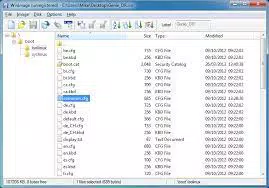
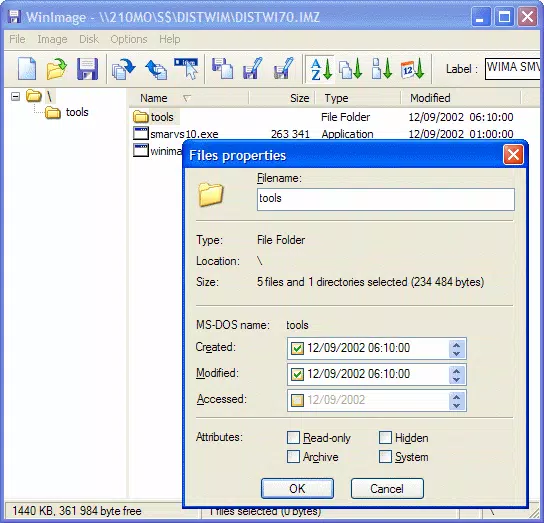
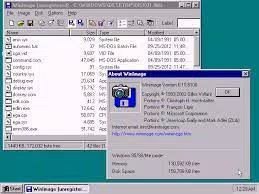
WinImage presents a straightforward, no-frills interface tailored to its utility-focused purpose. The layout prioritizes functionality over visual flair, with clear menus and toolbars that guide users through core operations like image creation, extraction, and writing. Navigation is linear and consistent, reducing the learning curve for users familiar with disk management tasks.
Although the developer did not list formal performance metrics, the application’s lightweight nature—only 3.7 MB in size—suggests efficient resource usage. It is expected to run smoothly on a wide range of Windows systems, including older machines that may lack modern hardware specifications. Responsiveness appears reliable during typical operations such as image creation and file extraction, with minimal delays under normal conditions.
Stability is a key strength, particularly when handling sensitive data or working with fragile media. The software’s ability to maintain data integrity during image processing indicates robust internal handling. While no specific error logs or crash reports were provided, the tool’s continued use in niche markets implies a stable and dependable operation.
Platform Compatibility & Technical Requirements
WinImage is available exclusively for the Windows platform. It supports Windows operating systems, though specific version requirements were not listed. The application’s file size is 3.7 MB, indicating a compact footprint that minimizes storage impact and ensures fast installation.
The developer did not specify minimum OS requirements, nor did they provide information about hardware specifications or compatibility with newer Windows versions. However, the software’s lightweight design suggests it is likely compatible with a broad range of Windows environments, including older systems. Users should verify compatibility with their specific setup before installation.
Pros and Cons
Pros
- Specialized tool for managing floppy disk images with precision
- Supports the Microsoft DMF format, enabling larger storage on standard floppies
- Facilitates digital preservation of legacy data and software
- Lightweight at only 3.7 MB, suitable for older systems
- Offers full lifecycle management: create, extract, write, and format images
Cons
- Exclusive to Windows; no support for macOS or Linux
- Price point of $29.95 may be high for casual users
- No cloud integration or automated backup features
- Interface lacks modern design elements or customization options
- Compatibility with recent Windows versions not explicitly confirmed
FAQ
Is WinImage safe to download and install?
Yes, WinImage is developed by Gilles Vollant and has been used in professional and archival settings. As with any software, it is recommended to download from official sources to ensure authenticity and avoid potential third-party modifications.
Can I use WinImage on Windows 11 or Windows 10?
While the developer did not specify compatibility details, the software’s lightweight design and long-standing presence suggest it is likely compatible with modern Windows versions. Users should test the application on their system to confirm functionality.
Does WinImage support Mac or Linux systems?
No, WinImage is currently only available for Windows. There are no official versions or ports for macOS or Linux operating systems.
What types of disk images can WinImage handle?
WinImage supports a wide range of formats, including standard floppy disk images and the Microsoft DMF format, which allows for increased data capacity on floppy disks. It can also manage other non-standard formats used in legacy environments.
Is WinImage free to use?
No, WinImage is a paid application priced at $29.95. It is not available as a free download or open-source tool.
Final Thoughts
WinImage stands out as a reliable, focused utility for users engaged in digital preservation, retro computing, or legacy system maintenance. Its ability to create, extract, and write disk images—especially in the DMF format—makes it indispensable for professionals and hobbyists alike. While its interface is dated and it lacks modern features like cloud backup, its core functionality is precise and efficient.
For those working with floppy disks, whether for archival, software recovery, or system deployment, WinImage delivers unmatched value. Its compact size and proven performance ensure it remains a trusted tool in niche but critical workflows.
Download WinImage now


